
2D
Explainer Video Script: How to Write One, Step by Step
How to write an explainer video script, shown on a real B2B script through three drafts, with a template.

Sergey
November 17, 2026
Most guides to explainer scripts show a made-up example for a made-up product. This one follows a real script through its versions: the 90-second B2B explainer we made for CloudLinux, from the first draft to the recorded voiceover, with the client’s comments and what we changed after each round. Along the way you get the format we use, a word-count guide and a template you can copy.
One number first. On a custom 2D explainer we made for an online service, art direction together with the script and voiceover text cost $800 out of $12,020. The script is one of the cheapest lines in an explainer budget, and it decides whether the other $11,000 is spent well.
An explainer script is a table, not a block of text. Ours for CloudLinux had five columns for every scene:
Above the table we put two short sections. “How to read this document” tells the client what to approve now: structure, meaning and order, not final wording. “Our decisions” explains the three or four choices behind the script, so the client argues with the logic, not with single words.
A common rule of thumb for voiceover is about 130–150 words per minute:
Treat the upper end as a ceiling. The second draft of the CloudLinux script had about 230 words of voiceover for the 90-second part. Even after approval, once the voice, music and sound effects were in, it ran long, and we cut six lines. Which length you need depends on the job: as we explain in our video blog episode on why one explainer costs $2,500 and another $30,000, first contact needs 15–30 seconds, while viewers further down the funnel will watch one to three minutes.
We started with four positioning documents, three brands, more than a dozen products and two audiences: hosting providers and web agencies. That was material for a ten-minute film. At the briefing, the main question was what to leave out: products in beta, the enterprise brand, customer logos that could not be shown, the company timeline.
Dates belong here too. Our first draft said “for 15 years”. The client’s comment: “Let’s stick to ‘since 2009’, so we can keep this video up-to-date for longer.”
A list of features is the most common weak script. We turned CloudLinux’s product layers into three jobs the platform does for customers: fast and stable, secure, patched. The script speaks in benefits instead of product names, and it counts to three, so a customer who knows one product sees there are two more.
The structure only works if the parts are parallel. In the first draft the third job opened with “And the third is time. Software ages.” In the second it became “The third is keeping the software patched”, the same shape as “keeping sites fast” and “keeping sites secure”.
First draft: “If you’re responsible for websites… you know the ground keeps shifting under them.” True, but vague. Second draft: “If you host or manage websites, you know where the hours go: keeping them fast, keeping them secure, keeping them patched.” The viewer recognizes their own week, and the three jobs are already named in the first seconds.
We did the same in the picture. Small badges for the three chores (a load spike, an alert, a pending update) appear on the sites in the hook, lift off when the brand appears, get resolved one per job and are gone by the end. One visual thread ties 90 seconds together without words.
The first draft promised that “a hacked site never means a call you have to make.” The second said what really happens: “We stop most attacks before they reach a site, and automatically contain and clean the few that get through.” A professional audience trusts a precise claim more than a promise of 100%. The same goes for scary statistics: the fact that critical vulnerabilities now appear weekly sits only in the patching block, right next to the solution.
Instead of two scripts, we wrote each line in words both hosting providers and agencies use, and let the picture split: the same sentence plays over hundreds of websites for a hosting provider and a handful for an agency. Before writing, we worked out how the product really works and gave each “character” one line in the team brief, for example “CloudLinux: a layer on top of the server’s basic software.” If the team cannot explain the product in one line, the viewer will not get it in 90 seconds.
The short brand reveal played on an event screen where nobody hears sound. So the on-screen column carries the meaning on its own: “SITES YOU HOST. SITES YOU MANAGE. → WHERE THE HOURS GO”, 01/02/03 numbering, and technical terms in small type. The voiceover is a richer layer for the website version.
We split the review into two passes. First the client approves structure and meaning. Then comes a separate pass on wording and timing. It keeps feedback on the right level: nobody polishes a sentence in a scene that may be cut.
The second round was all about words, which is how it should be. Comments came from both our copywriter and the client’s marketing team. Five patterns worth checking in any script:
Even then, the recorded version ran over 90 seconds. One of the six cuts:
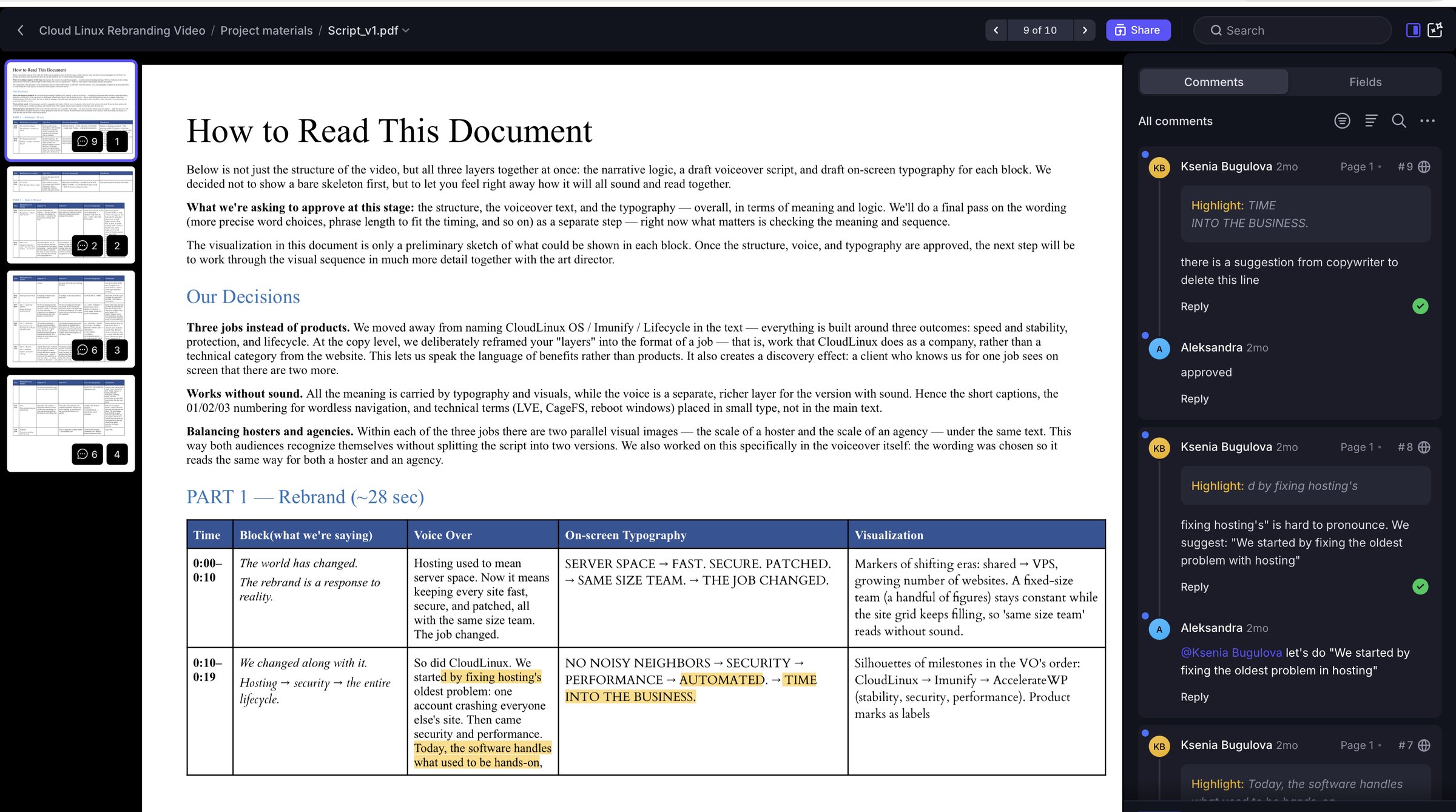
Copy this structure. Here is one real row from the CloudLinux script as an example:
A typical order for a 60–90 second explainer: the viewer’s problem, who you are, how it works in three steps or jobs, the main objection answered, the call to action.
Every explainer has one moment where the viewer may drop off. For our online service for YouTube creators, it was granting access to channel statistics. The script was built to show why a blogger needs the service and how easy signup is, so that this step felt safe. The video reached over 90% view-through on the landing page, and over 65% of the creators we contacted registered.
We price a script like the CloudLinux one, for a 90-second B2B explainer, at $600–700. That is a small share of the whole video: the full CloudLinux project, with illustrations, animation, voiceover, sound design and all export versions, came to about $11,000. For what drives the rest of the budget, see our breakdown of motion graphics examples and what they cost.
It can write a first draft if you give it a precise brief: product, benefits, audience, core message, length and tone. A useful trick is to record yourself talking about the product and turn that into the draft. Our guide on how to make a SaaS product video with AI includes the prompts. What AI will not do is the briefing: deciding what to leave out, which barrier to beat and which promise is too strong.
On CloudLinux, the script and storyboard took the longest of all stages. The client’s reply to the first full animated version was “Let’s keep going. No other feedback.” Every question about meaning had been settled on paper. Read the full CloudLinux case.
How many words is a 60-second explainer script?
About 130–150 words of voiceover. Leave room for pauses and sound, and time it by reading aloud.
What should an explainer video script include?
For every scene: timing, what the scene must say, voiceover, on-screen text and a first idea of the visual. Plus the call to action.
How many drafts does a script need?
On CloudLinux the first draft settled the structure, the second round of comments was only about wording, and a few lines were cut after the voiceover was recorded.
How much does an explainer video script cost?
We price a script for a 90-second B2B explainer like the CloudLinux one at $600–700.
Who writes the script, the client or the studio?
Usually the studio writes it from the client’s brief and materials. The client’s job is to say what matters, what to leave out and what is true about the product.
We write explainer scripts and produce the video from storyboard to sound. See our explainer video production services or request a quote.